How WhatsApp's voice transcription is supposed to work
WhatsApp added voice message transcripts in late 2024. Transcription happens on your phone, so audio isn't sent anywhere for processing.
- Turn it on: Settings → Chats → Voice message transcripts, then pick a transcript language.
- Use it: long-press a voice message and tap Transcribe. The text appears under the voice note.
When it works, it's handy. When it doesn't, the reason is usually one of the following.
Why WhatsApp voice transcription isn't working
1. The setting is off
Transcripts are off by default. If you don't see Transcribe when you long-press a voice message, turn it on in Settings → Chats → Voice message transcripts. Android may first download a language pack.
2. The language isn't supported
This is the most common cause. Supported languages depend on your phone:
- Android started with a short list: English, Portuguese, Spanish and Russian.
- iPhone uses Apple's speech recognition, so it covers more languages, depending on your iOS version.
If the voice note is in Urdu, Hindi, Punjabi or many other languages, WhatsApp may not be able to transcribe it on your phone at all.
3. The transcript language doesn't match the voice note
WhatsApp transcribes in the language you selected in settings. If you picked English and the voice note is in Portuguese, you'll get nonsense or "Transcript unavailable". People who switch between languages run into this all the time.
4. Siri is turned off (iPhone)
On iPhone, transcription relies on Apple's speech recognition, which needs Siri enabled. Turn it on in Settings → Siri (or Siri & Search), then try again.
5. Poor audio
Background noise, wind, several people speaking at once, or a phone held far from the mouth can all make transcription fail or come out garbled. There's no fix for this inside WhatsApp.
6. Old app or OS version
The feature needs a recent WhatsApp and a reasonably recent operating system. Update both.
7. It's still rolling out to you
WhatsApp rolls features out gradually, so some accounts get it later than others, especially on older phones.
The bigger limitation: one message at a time
Even when it works, WhatsApp's built-in transcription is built for reading one voice note while you're in the chat. It isn't built for keeping a record:
- There's no "transcribe all". You long-press each voice note.
- Transcripts aren't included when you export the chat. The
.txtfile still shows only the audio file name. - You can't edit a transcript to fix a name or a number.
- You can't print or share the transcripts alongside the conversation.
That's fine for a quick listen-free read. It's not fine if you need the conversation as a document for a dispute, a lawyer, a client file or your own records.
When you need a whole chat transcribed
If you need every voice note in a chat as text, in context:
- Export the chat with media. On iPhone: contact name → Export Chat → Attach Media. On Android: ⋮ → More → Export chat → Include media. (Full export guide)
- Upload the ZIP to WhatsApp Transcriptor and choose the spoken language. Around 50 are supported, including Urdu, Hindi, Arabic, Portuguese and Spanish.
- Review the transcripts next to the audio and correct names and numbers.
- Download a searchable PDF where each voice note appears in the conversation with its transcript underneath, plus the original audio files.
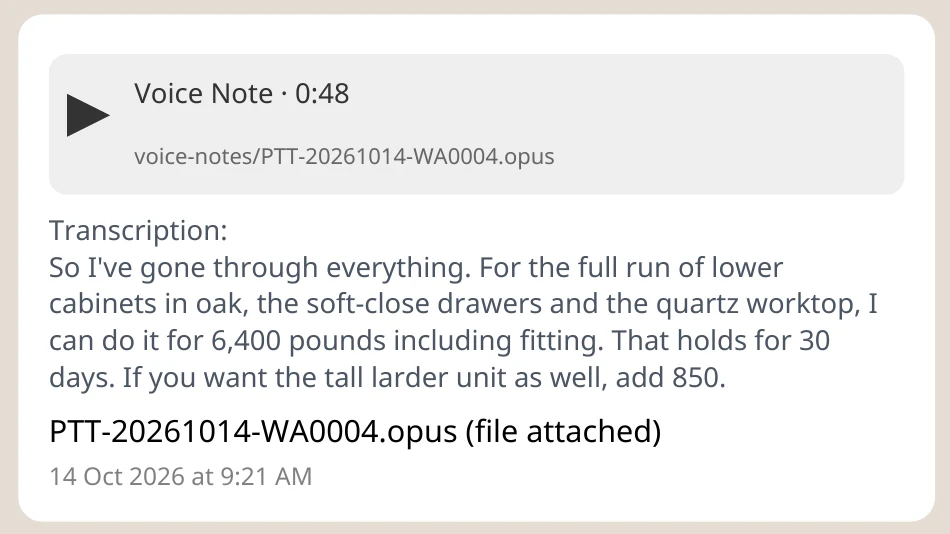
Where it was said. The voice note stays in the conversation, with the sender, time and length.
What was said. The transcript is real text, so it can be searched, copied and quoted. You can edit it before export.
The proof. The original audio file is named in the bubble and included in the voice-notes/ folder.
More detail is in how to transcribe every voice note in a chat at once.
FAQ
Why does WhatsApp say "Transcript unavailable"?
Usually because the voice note's language doesn't match your transcript language, the language isn't supported on your phone, or the audio is too unclear.
Does WhatsApp transcription work in Urdu or Hindi?
Support depends on your phone and keeps changing, and it's limited on Android. If WhatsApp can't do it, exporting the chat and transcribing the export is the reliable option.
Can I transcribe old voice notes?
Yes, if they're still on your phone. Long-press and tap Transcribe, or export the chat with media to transcribe them all at once.
Are WhatsApp transcripts private?
WhatsApp says transcripts are generated on your device, so the audio isn't sent to WhatsApp to be transcribed.