If you've ever had to work out what was agreed in a chat where half the conversation is voice notes, you know the problem. You scroll, tap play, listen, scroll again, and forget which message said what. Doing that for a chat with 80 voice notes takes an afternoon.
This guide covers three ways to get WhatsApp voice notes into text, and when each one makes sense.
Option 1: WhatsApp's built-in voice message transcripts
WhatsApp can transcribe voice messages on your phone.
Turn it on: Settings → Chats → Voice message transcripts, then choose the transcript language.
Use it: long-press a voice note and tap Transcribe. The text appears under the voice note.
Good for: reading a voice note in a meeting or on the bus.
Limitations:
- It works one voice note at a time. There's no "transcribe everything" option.
- Language support is limited, especially on Android.
- Transcripts aren't included when you export the chat, so you can't keep, print or share them as part of the conversation.
If the built-in option isn't working at all, see WhatsApp voice transcription not working?
Option 2: Forward voice notes to a transcription bot or app
Several bots and apps transcribe a voice note you forward to them.
Good for: occasional single messages in a language WhatsApp doesn't support.
Limitations:
- Still one voice note at a time, plus the forwarding.
- The transcript ends up in a different chat, detached from its context: who said it, when, and in reply to what.
- You're sending private audio to a third-party bot. Check where it goes.
Option 3: Export the chat and transcribe it all at once
If you need the whole conversation as a document, transcribe from the export:
- Export the chat with media. On iPhone, tap the contact or group name, then Export Chat → Attach Media. On Android, go to ⋮ → More → Export chat → Include media. Save the ZIP. (Detailed export guide)
- Upload the ZIP to WhatsApp Transcriptor. Every voice note in the export is found and matched to the message where it was sent.
- Choose the spoken language (around 50 are supported) and, for long chats, the date range you need.
- Check the preview and price. You pay for the minutes of audio in your chat, and you see the total before paying.
- Review the transcripts. Play each voice note next to its text and correct names, numbers and unclear words.
- Download the PDF. Every voice note appears in the conversation with its transcript under it. The PDF is searchable, so you can find the voice note where someone said "Friday" or "500".
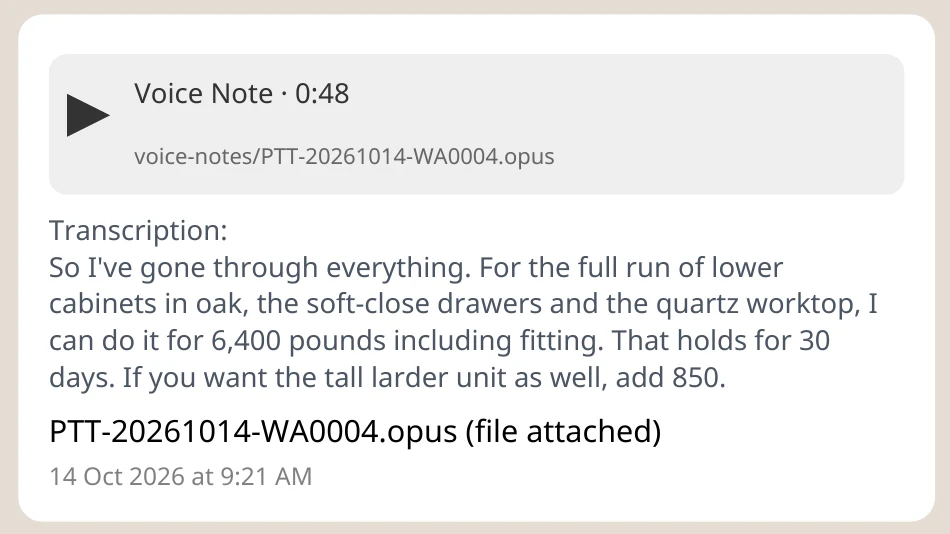
Where it was said. The voice note stays in the conversation, with the sender, time and length.
What was said. The transcript is real text, so it can be searched, copied and quoted. You can edit it before export.
The proof. The original audio file is named in the bubble and included in the voice-notes/ folder.
Good for: disputes, client and supplier records, legal and HR matters, family archives, and any chat you need to read rather than listen to.
Tips for accurate transcripts
- Pick the right language. If voice notes switch between two languages, choose the one used most and correct the rest during review.
- Correct names and numbers first. Transcription models handle ordinary speech well. Names, amounts, addresses and dates are where errors cost the most.
- Keep the audio. The export includes the original voice notes in a
voice-notes/folder, so anyone can check a transcript against the recording. - Export from the phone that has the full chat. If the voice notes were never downloaded to your phone, they won't be in the export.
FAQ
Can WhatsApp transcribe all voice notes automatically?
No. WhatsApp's own feature transcribes a voice note when you ask it to, one at a time. To transcribe a whole chat, export it with media and transcribe the export.
Why aren't my voice notes in the export?
The chat was probably exported without media. Export again and choose Include media or Attach Media. Very old voice notes in a long chat may also fall outside what WhatsApp includes in an export.
How long does it take to transcribe a chat?
It depends on how much audio there is. A chat with a few dozen short voice notes is typically ready within minutes, and you can leave the page while it processes.
Can I transcribe WhatsApp voice notes in Urdu, Arabic or Portuguese?
Yes. Choose the language when you upload. Right-to-left languages such as Urdu and Arabic are laid out correctly in the PDF.